stock,
Something happened with the media tags where it puts video:youtube as the start tag, but the end tag is video.
Since then the tags don't work...

It's not the media tag that has changed. It's the API on the youtube side. When you use the media tags provided by our Forum you get a blank line. This is because our Forums are recognizing the request to embed the video - but the youtube API is no longer returning a preview image nor start-play link. And this is because of advertising revenue protection settings. They don't want their videos playing 'framed' within another website (without their ads - or worse someone else's ads).
Even when logged on to the youtube site as the video owner - I can't get the youtube API to preview/frame-play my own videos here :-(
|video:youtube]
https://www.youtube.com/watch?v=WMf8eQnj1kI&feature=youtu.be[/video|
When you changed the [/video] end-tag to match the youtube video prefix tag the Forums php coding didn't know what to do with the undefined tag 'bracketing' the URL so it created a link (which is the default handling when rendering a post).
In the future you are better off just using the "Create link" widget:
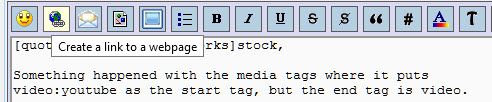
there are two inputs (the URL to the remote site - in this case a youtube video) and a description.